
To improve the SEO On Page of a website, it is important to know in advance:
- What is our target audience?
- What topics interest him/her?
- What is he/she searching for?
- How does he/she searches for it?
Once we know this data we can adapt both the theme and the content of our website to the previous variables.
Keywords are the words we use when writing our website. It will be necessary to choose them well, especially the words used in titles, headings, bold, etc., since our positioning in search engines will depend on them.
If we choose infrequent words or words that users barely use when searching, we will not be able to have a good position in the search results. On the contrary, if we use common and frequent words, which most users use to search, we will see how our position in the search results will improve.
That is why in this article we will see a series of tools for choosing keywords that will also allow us to get a much clearer idea of the profile of our target audience with keyword recommendations.
Google Analytics 4 GA4, most used keywords
Before knowing how to analyze and choose keywords with Google Analytics 4, it will be necessary to connect Google Analytics and Google Search Console.
Once this is done, within the Google Analytics page, we will go to “Reports”, “Search Console”, “Queries”. We can also access it using the search bar and writing “Queries” in it to obtain keyword recommendations.
The Google Analytics queries section provides us with the following information:
- Search query: What terms or keywords the user has used.
- Impressions: Times that our website has appeared in search results using the previous term.
- Clicks: Times the user has accessed or clicked on our website with that search term.
- Average position: Average position that our website occupies in the search results.
- CTR or percentage of clicks or impressions. Percentage that indicates the number of times the user has clicked on our page per 100 impressions. The CRT formula is “clicks / number of total impressions”.
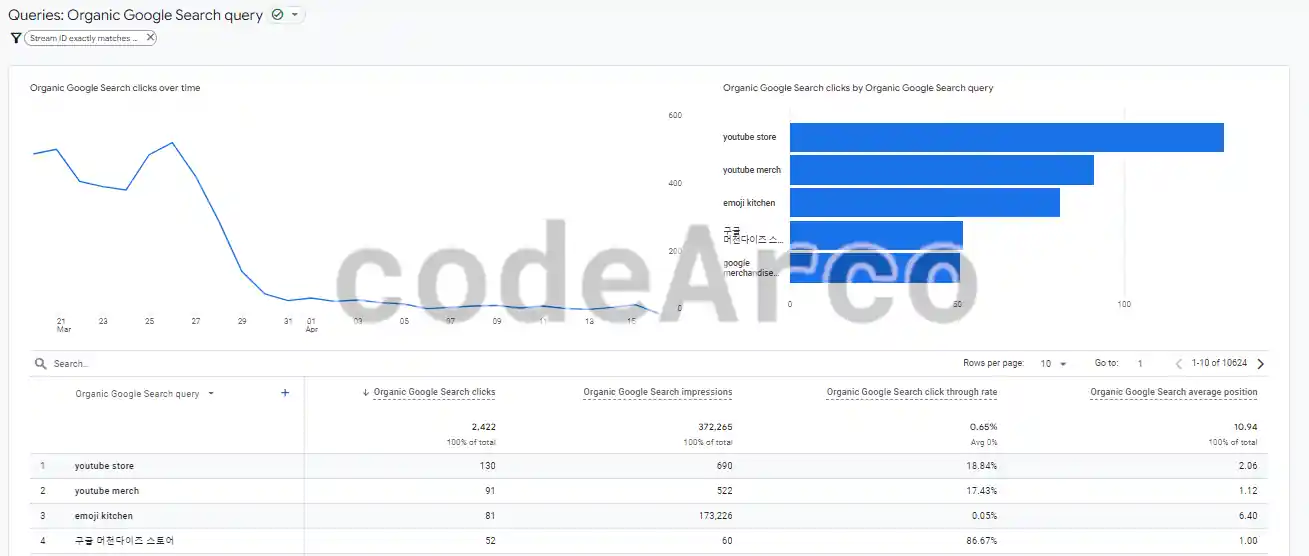
This tool will allow us to know the most popular search terms or trends on our website, those that provide us with the most impressions and/or clicks, as well as knowing what and how the user searches. This allows us to adapt to how the user searches and, therefore:
- Adapt the words used or the content of the publications to this list, placing more emphasis and using the terms that have the most impressions and clicks.
- Adapt the topic of future articles to what is most requested by the user.
Google Ads, keyword recommendations
Before obtaining keyword recommendations with Google Ads, it will be necessary to create a free account in Google Ads without a credit card.
Once logged in to the Google Ads page we will go to “Tools”, “Planning”, “Keyword Planner” and, within this section , we will search for “Discover new keywords”. If, for some reason, this menu does not appear, you can enable it in the upper right, “Design”, “Discover the new design”.
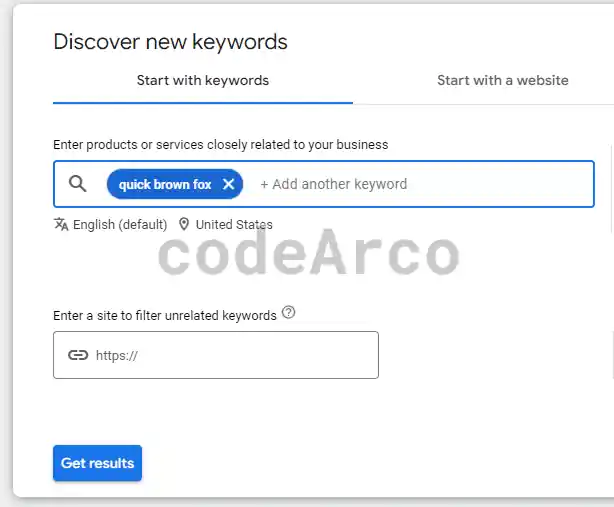
In the section to discover keywords with Google Ads we can do the search in two ways:
- Start with keywords. Google will provide us with keyword recommendations based on the words or phrases we enter. Optionally, we can enter a website that is related to our content (for example, our own) and Google will exclude keywords that have nothing to do with the content of the entered page.
- Start with a website. Similar to the previous one except that here we do not enter the keywords, only the web page that has to do with what we are looking for. Therefore, the keyword recommendations will be solely based on the content of the website that we post.
For both sections, you should use a website that has a good density of words related to what we want to get ideas from so that they can give us accurate recommendations. A good option is to introduce competing websites that we know are well positioned or websites with a lot of related content, such as a Wikipedia article.
The Google Ads keyword planner provides us with the following information:
- Keyword. Google Ads keyword recommendations.
- Average monthly searches. Average that indicates, for those keywords, how many searches are performed per month on average. The higher the value, the better.
- Competition. How much competition those search terms have or, in other words, how difficult it will be to position ourselves. The lower the value, the better.
- Rest of columns. They are indicators of how much it would cost us to appear as an ad in Google results. Since this part does not interest us in this article we will not delve into it.
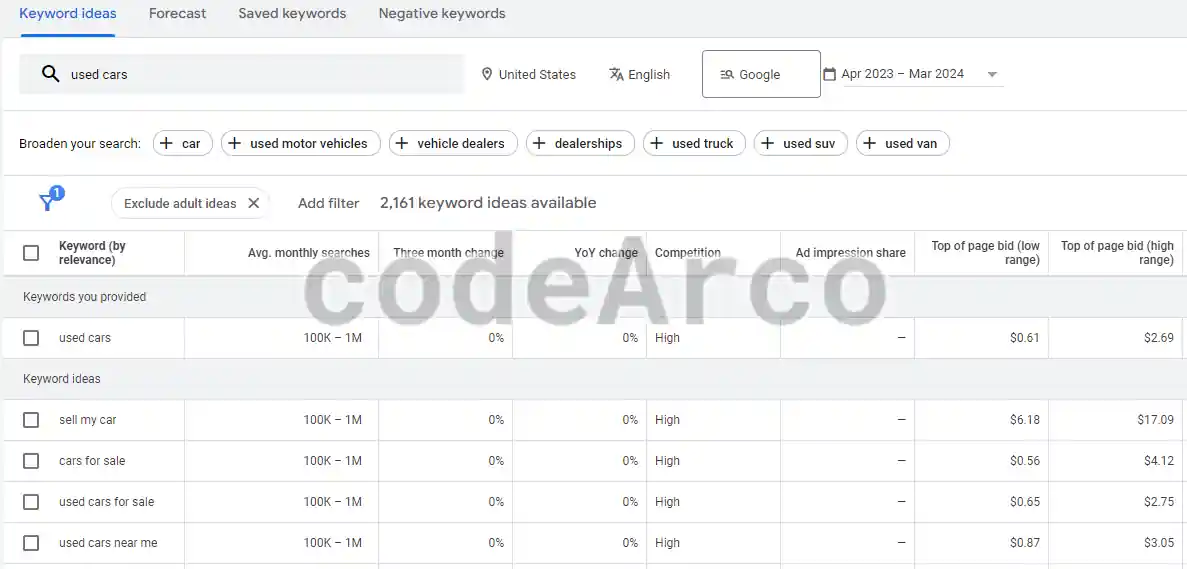
This tool, unlike the previous one, does not allow us to obtain the most popular search terms on our website. Its strong point lies in obtaining keyword recommendations based on the terms and/or other web pages. This, in turn, will allow us to adapt our page using words and concepts that have a high search average and low competition since it will be much easier for us to position ourselves with them.
Google Trends, keywords trend
Google Trends is another useful Google tool to obtain keyword recommendations that does not require having a Google account.
Once we have searched for the term we want, Google Trends will provide us with the following information:
- Interest over time. Indicates, in a range from 0 to 100, the public’s interest in said term throughout the period of time that we have set.
- Interest by region. The same as the previous one but by geographical area. Very interesting when applying SEO in different countries or International SEO.
- Related topics. These are not topics related to the search term, they are topics that are also of interest to users who have searched for the term we are analyzing and, therefore, the terms that appear in this section do not have to have any relationship between them.
- Related queries. The same as the previous one but here we have the exact query used by the user.
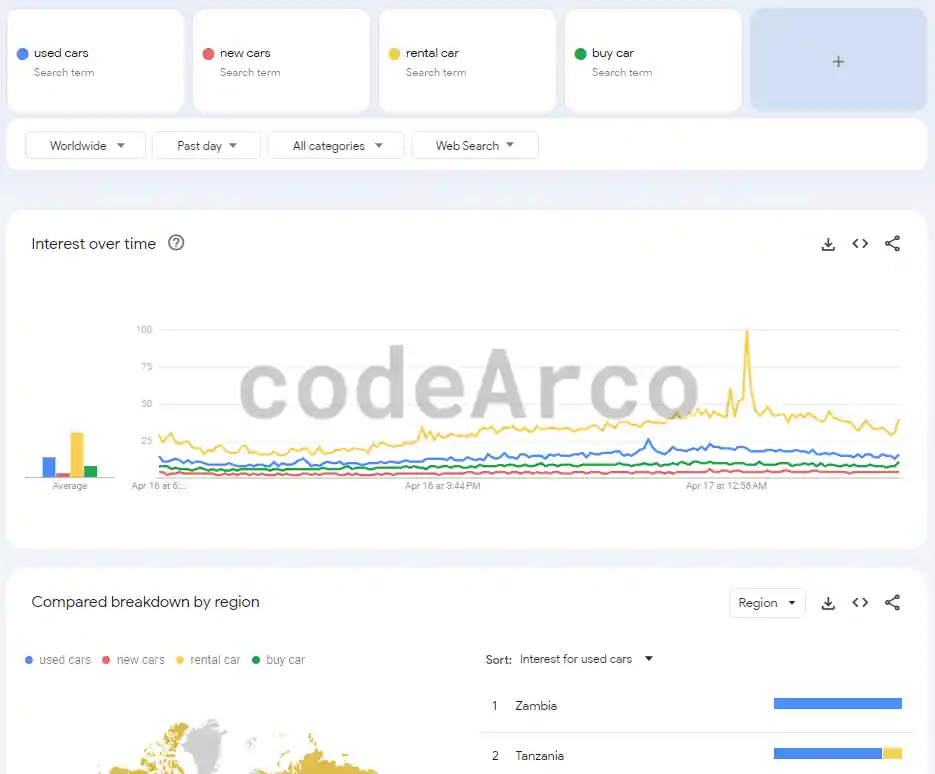
The advantages of Google Trends are:
- It allows us to know the search trends over time of users globally, by country and by region. This will allow us to know in advance if what we are going to publish is in demand by our target audience taking into account their location.
- It allows us to obtain other topics that users are interested in and that do not have to coincide with the keywords we are analyzing. This provides us with new topics that our target audience is interested in and that we can incorporate into our website.
- We can perform comparisons of multiple terms. With this we can choose between one term or another in case we have doubts.
Google Instant and Google Suggest to choose keywords
Of the tools seen so far, these two are the simplest options for keyword recommendations, but they are not the least powerful. Both tools are accessed directly through the Google search engine.
On the one hand we have Google Instant which provides us with a list of suggested searches when we are typing in the search bar.
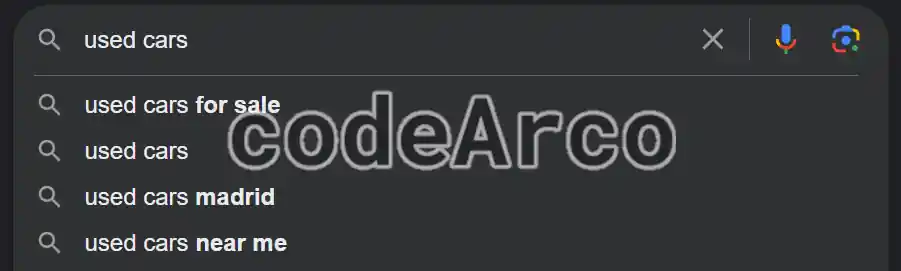
This list of search suggestions is built based on what is being searched at that moment, the search history and the searches of all users over time.
On the other hand, located at the bottom of the page, we have Google Suggest. The only difference with the previous one is that the search suggestions are not based on what is being typed at the moment but on the search that has just been performed.
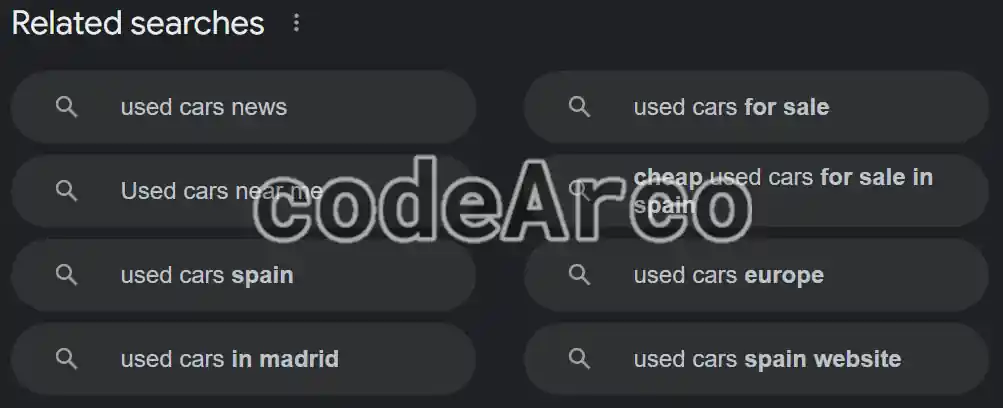
The advantages of Google Instant and Google Suggest lie in their simplicity, it is not necessary to have a Google account or get lost in complicated menus.
Again, we can use the information provided by both tools to understand user search trends as well as the keywords they most use to adapt the theme and content of our website.
SEMrush, powerful tool for choosing keywords
SEMrush is a tool in paid version used for multiple purposes, such as analyzing the SEO of the competition.
For the case at hand, the analysis and keyword recommendations, it will be enough to create a free account in SEMrush, log in and write the keywords or web page to analyze in the search box.
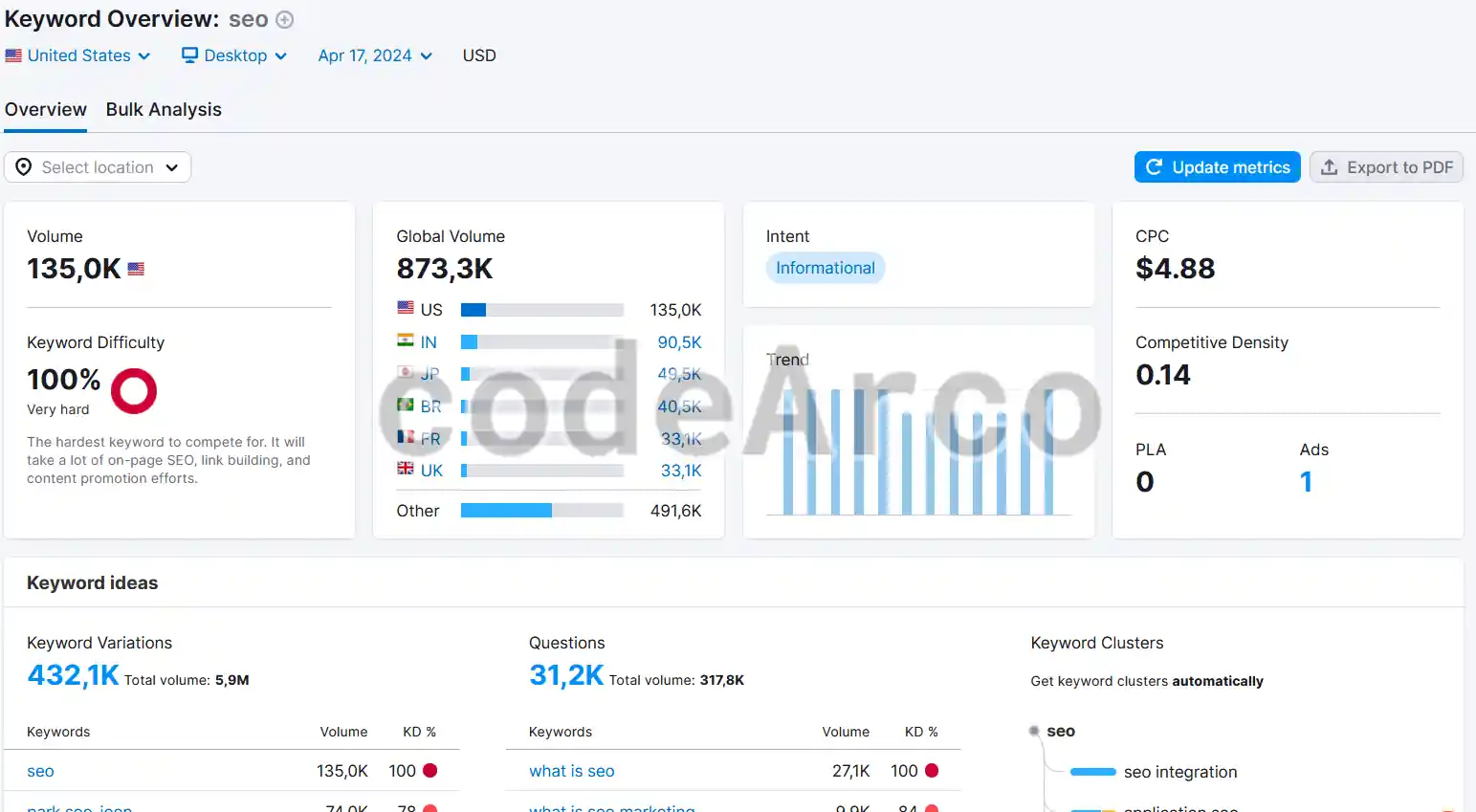
On the general screen “Keyword Overview”, SEMrush provides us with the following information:
- Search volume. Indicates the number of searches for the keywords or web page we are analyzing and for the country we have chosen.
- Difficulty of key terms. It is the same concept as “Competitiveness” of Google Ads, the higher this value is, the more difficult it will be for us to position ourselves.
- Traffic volume by country and global. It is the search volume applied to the entire world and by specific country.
- Search trends over time. How the search volume has varied over twelve months.
- Keyword variations. Variations of the search terms we are analyzing by changing the order of the words and with some additional keywords.
- Questions related to keywords. Related searches from users asking for topics similar or identical to the one we are analyzing.
- Related keywords. Similar to the variations with the difference that searches with the word order changed with respect to the analyzed keywords are not taken into account here. In other words, here searches are presented with a lower degree of relationship than those in the variations section.
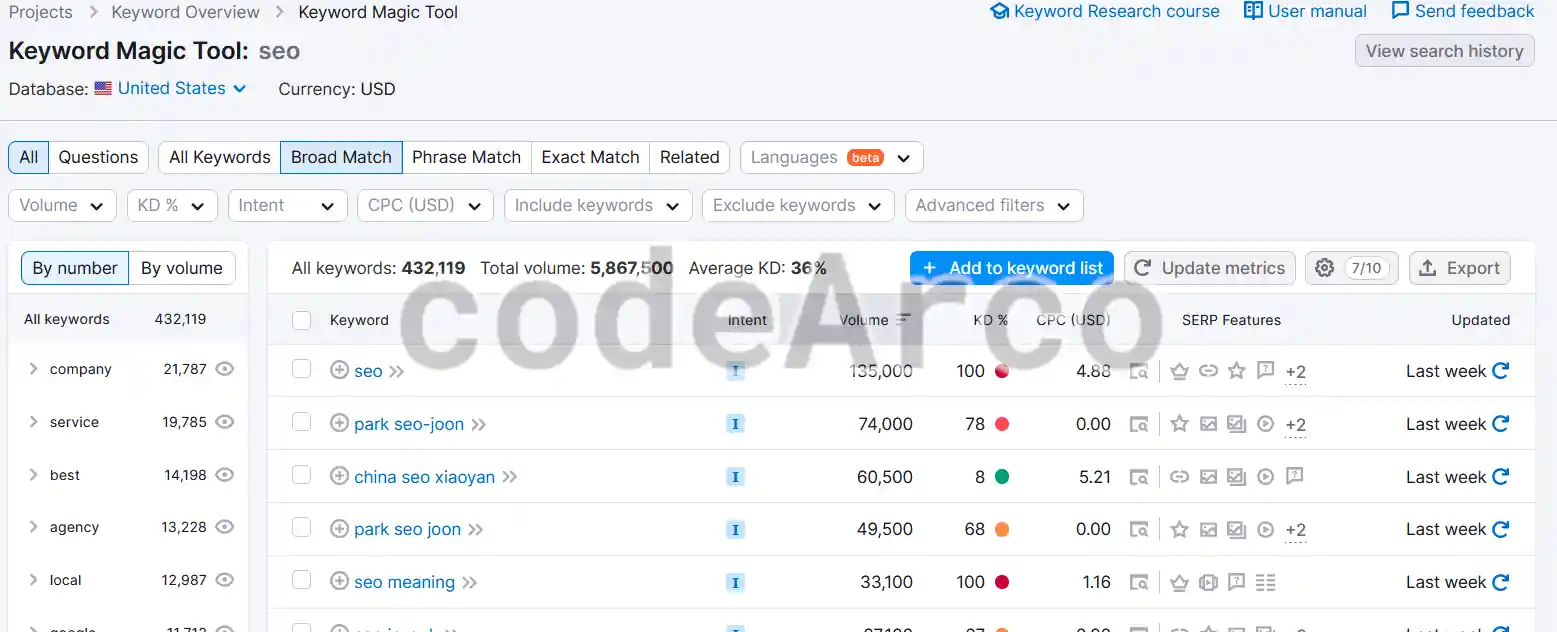
If we want to go a little deeper, in the side panel, within “Keyword Research”, we have several sections such as, for example, Keyword Magic Tool. This tool is very similar to the one we saw in Google Ads and provides us with a list with the following information:
- Keyword. Suggested search terms related to what we are analyzing.
- Search volume. Average monthly searches over the last twelve months for the search term.
- Trend. Small graph with the evolution of search volume over time.
- KD or positioning difficulty. Keyword Difficulty shows the level of difficulty of overtaking the competition in the first twenty Google results. The higher the value, the greater the difficulty.
- CPC or average price per keyword. Average price advertisers pay per user click on the ad that appears on Google when using those keywords as a search term.
- Competitiveness. Level of competition between advertisers who pay to appear advertised for that search term.
- Results. Total number of pages displayed in search results for that specific term.
The advantage of SEMrush is its power, amount of data and types of analysis it offers. We could say that, by itself, it is the most powerful tool because it combines in one place all the tools seen so far from Google.
Obviously, the downside to SEMrush is that it is paid and its features are limited to a few free searches per day.
Moz, alternative tool for keywords
Moz is an alternative to choose keywords in paid format used, like SEMrush, for various objectives such as, for example, the analysis of link metrics.
To analyze and get keyword recommendations we will have to create a free account, log in and go to the “Keyword Explorer” section where we have the following information:
- Monthly traffic volume. Monthly traffic volume for the term we are analyzing.
- Positioning difficulty. How difficult it will be to position ourselves with those keywords.
- Organic traffic. Estimated organic traffic.
- Suggested keywords. Keyword recommendations that the tool suggests indicating the monthly volume of traffic. We can go into detail and obtain a much more complete list.
- SERP analysis. Analysis of organic search results.
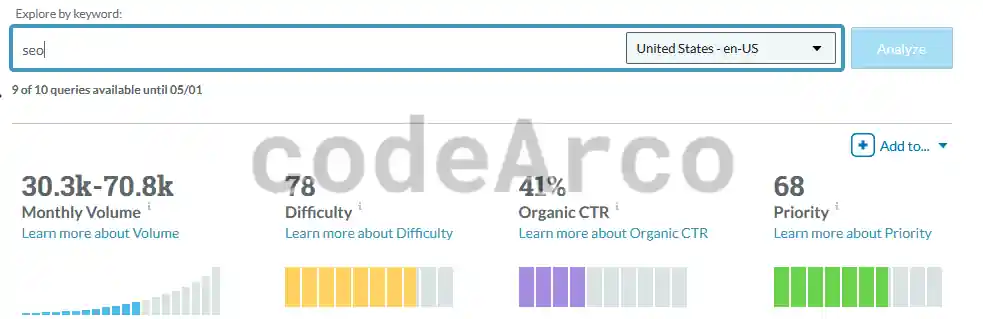
The advantage of Moz is similar to that of SEMrush, it is a quite powerful tool that is not only limited to keyword recommendations.
However, like SEMrush, the disadvantage of Moz is that it is paid and only allows us to perform ten daily searches or analyzes for free.
As you can see, there are many alternatives to choose keywords, each of them with their advantages and disadvantages. You can choose the one you like the most, the one that you see as most complete, or even use several of them simultaneously to obtain more complete results.
However, although this is an important point to improve the SEO On Page of a website, do not forget that the most important thing is to create quality, useful and interesting content for your target audience.