
In this article we will see how to perform a competition SEO analysis through multiple tools.
Although throughout this SEO course we have seen multiple tools to analyze the SEO of our website, this time we will use them to analyze the competition’s websites.
For this purpose, any tool that does not require us to be owners of the website will be useful, such as Majestic. On the other hand, tools like Google Analytics that require proving that we are owners of the website will not be useful to us.
Why analyze the SEO of competition
Everyone knows that information is power and, even more so, when it is processed and summarized. This will allow us to carry out an analysis that will provide us with multiple conclusions and actions to take.
However, we can go a step further, we can compare that information and those analyzes with other similar ones to get an idea of the place each of them occupies.
If we transfer these ideas to SEO, an analysis of the competition will allow us to know, in a generic way:
- Comparison with the competition, that is, where we are compared to it.
- Strengths, in which points we stand out compared to our competitors. The key is to reinforce our strengths, put more emphasis on them.
- Weaknesses, in which aspects our competitors are better than us. In this case we will have to work and improve those points where they surpass us.
Specifically, some concrete examples of why it is convenient for us to analyze the competition’s SEO are:
- If we know that a certain keyword brings a large volume of traffic to the competition, a good idea would be to write articles about that topic.
- If our density keyword and/or keyword prominence for a given keyword is lower than that of the competition, a good idea would be to try to exceed these values (taking special care to avoid penalties from Google).
- If we know that a certain geographic area or language provides a large volume of traffic to our competition, we could implement a multilingual website or increase the number of languages on our website to obtain more traffic.
- If we know which are the highest quality links and which provide the most traffic to the competition, we could try to obtain similar links.
As you can see, there are infinite reasons why we need to analyze and compare ourselves with the competition, it consists of using imagination, but it all boils down to the fact that it will allow us to improve the SEO of our website with respect to them.
Google Ads to choose keywords
Google Ads is a tool that we already saw when we discussed tools to choose and analyze keywords.
After creating a free account in Google Ads and logging in, we will go, on the left, to “Tools”, “Planning” and “Keyword Planner”.
We will select “Discover new keywords”, “Start with a website” and we will enter the url of the page to analyze, that is, that of our competition.
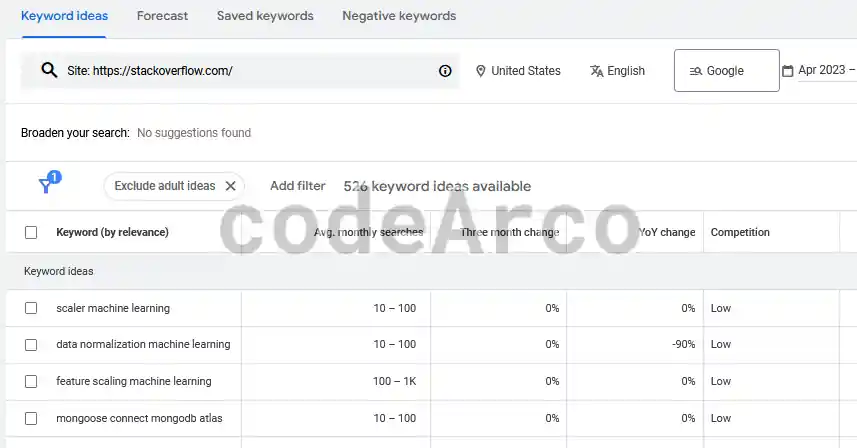
The list that appears is very useful to know the terms of a website that provide you with the most organic traffic. The information in the Google Ads table is as follows:
- Average monthly searches. Average number of searches performed for that term.
- Competition. Difficulty in positioning ourselves for the keyword in the listing.
- Fields related to Google Ads ads, such as ad impression share or bid cost.
WebPageTest for performance and speed
WebPageTest is one of the tools we use to optimize the speed of a website.
This tool is interesting from the point of view of SEO competition because it will allow us to know the status and times of our website and be able to compare this data with those of competitors. With this we can know which areas to improve on our page to have better results than them and, therefore, improve our positioning in search engines compared to the competition.
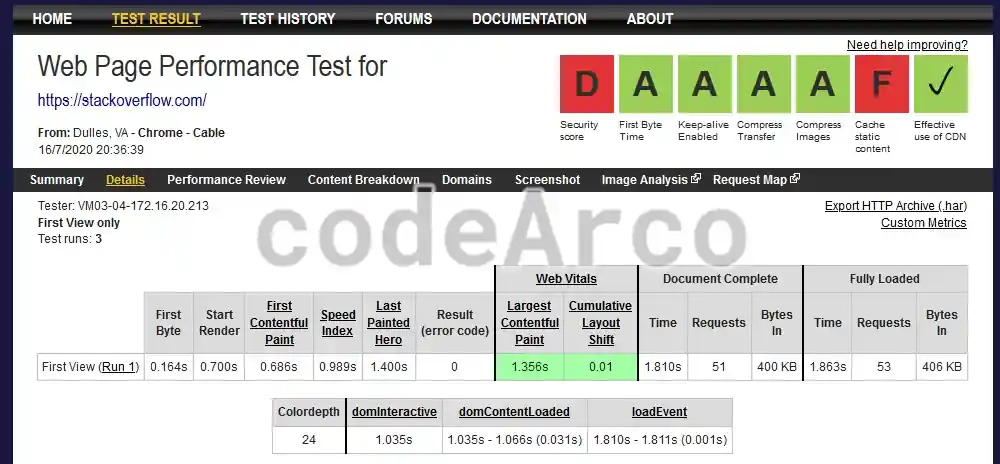
The information we have in the analysis with WebPageTest is:
- In the upper right we have a summary of the speed and performance score obtained by the website. If any of them appears in red it means that that aspect can be improved and we will have to investigate what exactly it refers to by clicking on it.
- Below we have a very interesting table on website loading times. The most important are Start Render, which indicates the time in which the web page begins to be painted (the value should be less than 2-3 seconds) and Document Complete, which is the time in which the web page is fully loaded.
- At the end we have the Waterfall or the detailed web load analysis. It allows us to see all the elements that are loaded, how long they take and the order in which they do so.
If we click on the different parts of the report we can see a very detailed list of why certain parts can be improved.
PageSpeed Insights and mobile friendly
PageSpeed Insights is a tool that allows us to know the score of a competing website in a similar way to WebPageTest although, from my point of view, it is much more powerful. The main sections of PageSpeed Insight are:
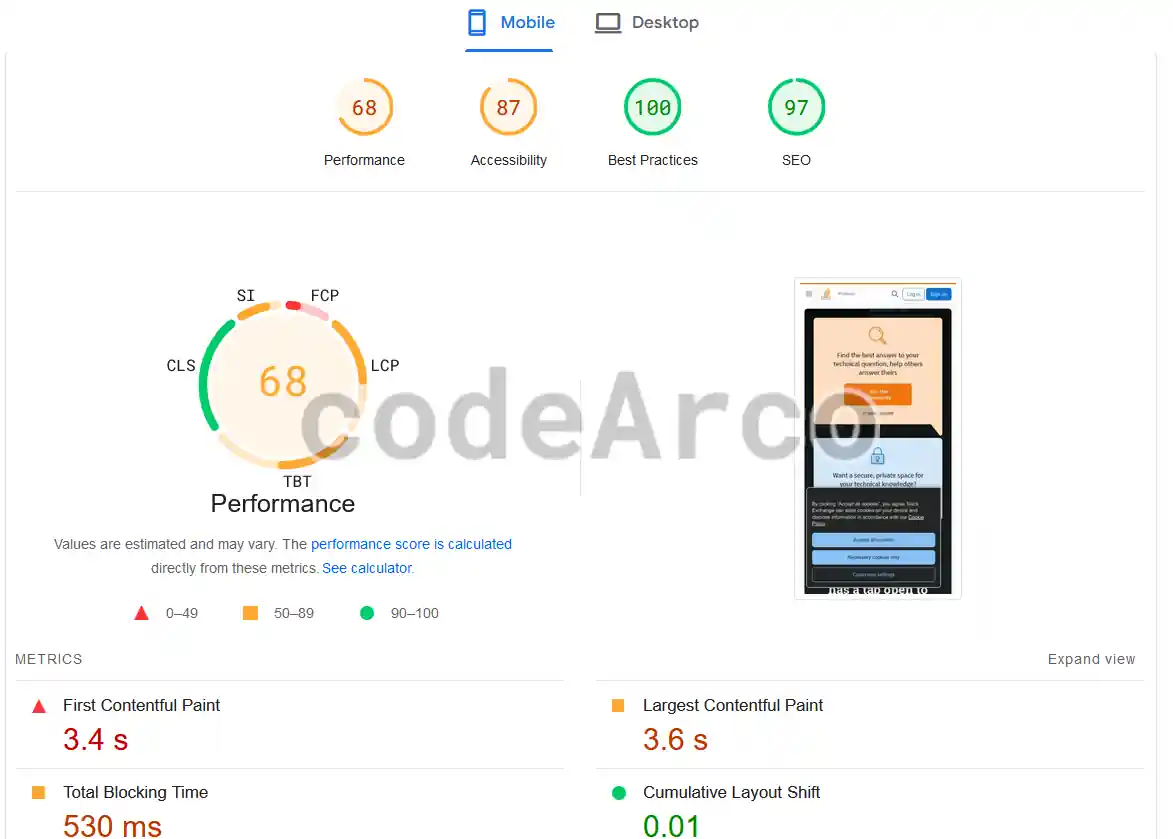
- Web performance. Various recommendations and performance bugs, such as whether to minify javascript files or remove CSS code that is not being used anywhere.
- Web accessibility. Improvements aimed at people with certain limitations, such as color blindness. Within this section we find some tips and errors such as, for example, the background and text color not having enough contrast.
- SEO recommendations and tips. Perhaps the most important point for this SEO course, we will see some SEO errors such as, for example, that the document does not have the <title> element to be correctly indexed or that the images do not have their “alt” attribute.
- Best practices, errors and web recommendations that do not fall within the above categories.
These metrics can be used both for browsing from a computer and through a mobile device and, therefore, they will also allow us to know if our website is mobile friendly or not.
Majestic and link analysis
Majestic SEO is a tool that we use to analyze the links and metrics of a website. It is a paid tool but allows you to perform some daily searches for free with limited functionality.
It is not the most complete tool but it provides important information, especially regarding links or SEO Off Page.
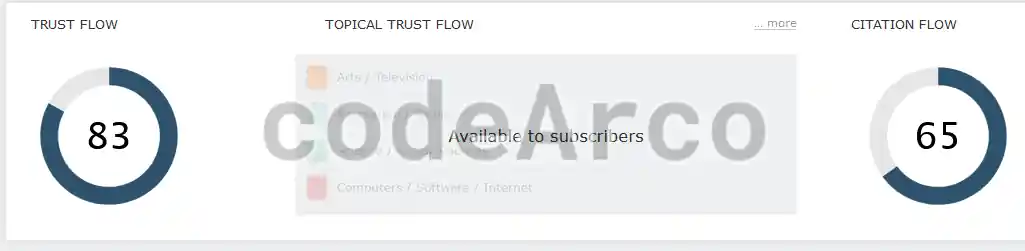
Once the search has been completed in Majestic we have the following sections:
- Trust flow or quality of links. Metric that tries to measure the quality of the links that point to that website.
- Citation flow or number of links. This metric is an approximation of the number of sites that point to the analyzed website.
- Backlink breakdown. Of the links that point to the website, how many are active, how many are direct, follow, no follow, http, https… etc. We also have graphics that indicate the type of link, such as text, images or redirects.
- Anchor text. As we already saw, it is very important to know what anchor text they link to us with because if the words they use have nothing to do with the linked content, that link does not favor us. In the case of competition analysis, it will be interesting to analyze the keywords that are most used as anchor text.
RanksNL and full SEO audit
RanksNL is a tool that allows us to carry out a complete SEO analysis or audit of any website. The tool is also paid but, for free, we can request three audits.
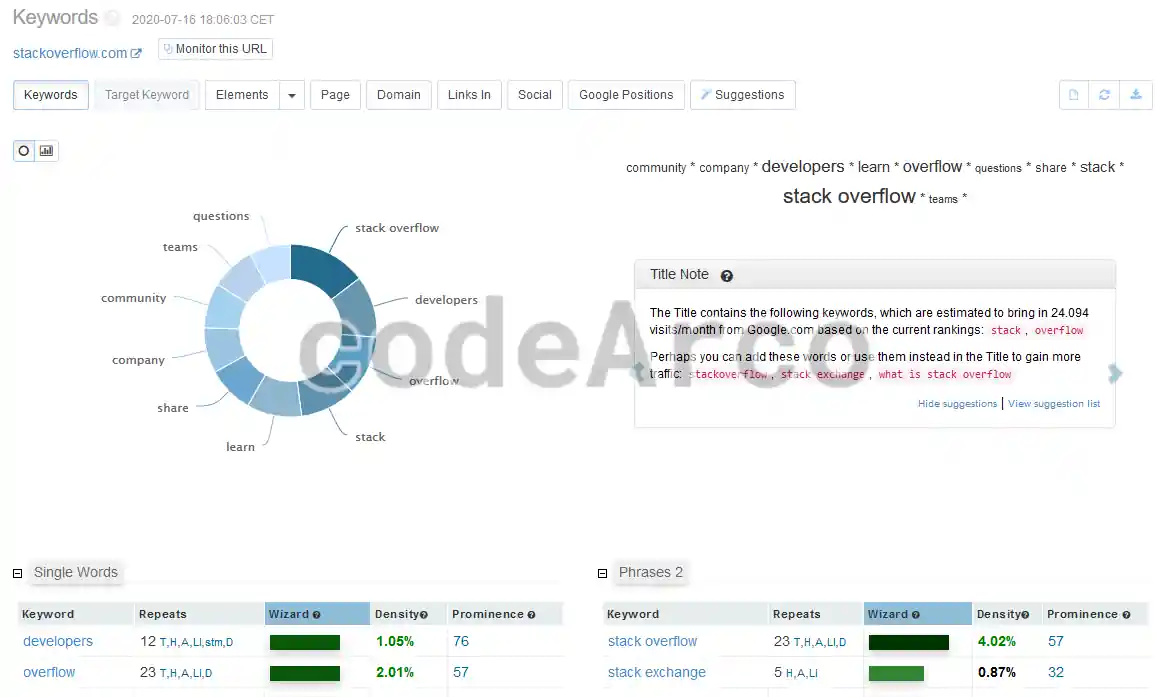
On the audit page we have several sections that, in summary, provide us with the following information:
- Keywords. In this section we basically have a list with the most used words on the website and indicators of the density and prominence of keywords, key factors of SEO On Page that indicate the importance of the keywords based on the number of repetitions and where they are located in the HTML respectively.
- Elements or analysis of the HTML content of the web page. We can find curious things regarding SEO such as, for example, the keywords and where in the HTML they are located (title, headings… etc), outgoing links and anchor text used in them, images and alt attributes used… etc.
- Page or web statistics. General information and statistics of the website, such as, for example, the language used, size, encoding… etc.
- Domain or web domain information such as, for example, the IP address, type of server or place where the website is hosted.
- Links in or incoming links. Information regarding the links that point to us, is not available in the free version.
- Social network. Information that has to do with social networks, also not available in the free version.
- Google position or position on Google.
On the one hand we have Google positions where we can see a list of keywords and the position they have in Google. Additionally, the list will indicate whether the web page contains that keyword or not and, therefore, if the keyword interests us we should include it on the website to obtain traffic.
On the other hand, we have Competitor Domains where we have a list of the main competitors of the analyzed website along with their relevance as a competitor and a percentage that indicates how many common words we have with them. - SEO suggestions and tips. Another of the most interesting sections consists of a list of suggestions to improve the SEO of the website analyzed, such as, for example, what keywords to include to obtain more traffic.
Semrush and complete SEO analysis
Semrush is a tool that we already use to choose keywords when writing a web page. However, it is a very complete SEO tool that we can also use to analyze the competition. It is paid although it allows a limited daily number of free searches.
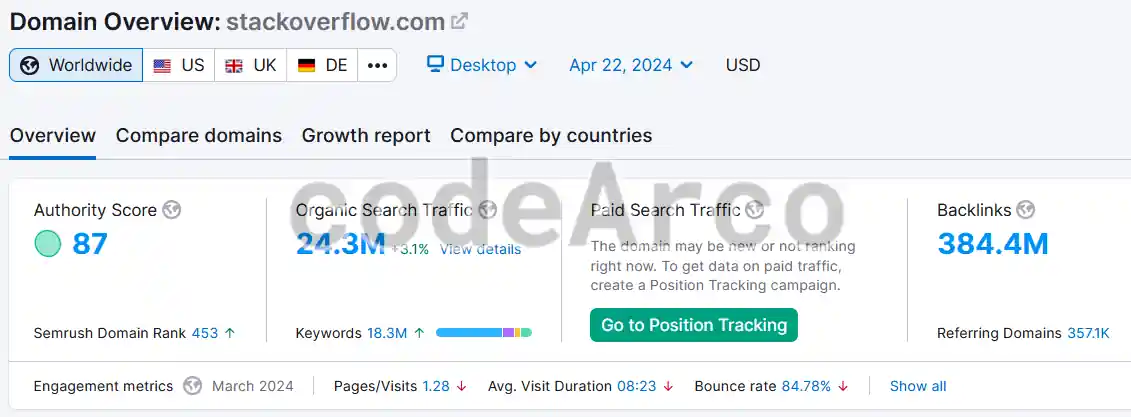
In the “General Overview” or “Domain Overview” sections of SEMrush we will find the following information:
- Authority score SEMrush. It is SEMrush’s own metric that indicates the importance of the website based on the number of links pointing to it and organic traffic, among others.
- Organic traffic or organic search. Organic traffic is the traffic that a website receives through search engines such as Google or Bing.
- Inbound links or backlinks. Number of links pointing to the website. At the bottom we have a list of the backlinks along with the anchor text used in them, number of follow and no follow links, types of links… etc.
- Keywords by country. Keywords ordered by country or language, interesting for International SEO.
- Traffic trend. Evolution of the volume of visits over time.
- Best organic keywords. List of keywords ordered by the volume of visits they provide to the website from search engines.
- Main organic competitors. List of web pages ordered by the level of competition at the organic search level.
- Best anchor text. List of the best anchor text, that is, words used in incoming links ordered by the volume of traffic they provide to the analyzed web page.
- Best referring domains. List of domains that link the most to the analyzed website.
- Indexed pages. What pages have search engines indexed to be able to show them in search results.
We will not explain the rest of the sections since the tool has many options. However, if you want to know how to use SEMrush to analyze keywords, you can use the link at the beginning of this section.
Moz and Ahrefs for links and keywords
Moz and Ahrefs are two tools that we use to obtain link or backlink metrics.
Once we have logged in, in Moz we have the following sections:
- Local moz. It allows you to check and manage aspects related to Local SEO.
- Keyword explorer. Within this, as we already saw when analyzing keywords, we have various data such as, for example, the monthly volume of traffic, positioning difficulty, organic traffic, keyword suggestions or SERP analysis.
- Link explorer. In this section we also have quite useful information such as domain authority (metric that indicates the importance of the site based on incoming links), number of linking domains and incoming links, metrics over time, most important links, pages more linked, anchor text that gives us more traffic… etc.
Ahrefs has the following categories (which we are not going to analyze since it is a paid tool):
- Site explorer.
- Keywords explorer.
- Site audit.
- Rank tracker or position tracker.
- Content explorer.
The difference between Moz and Ahrefs is that Moz is a paid tool that allows us to perform ten free daily searches and Ahrefs is a paid tool without the possibility of being used for free.
As you can see on the Internet there are infinite tools to analyze SEO competition, any that does not require us to be owners of the website will serve us well. With them we can obtain data on the competition, know where we are in relation to it, know our strengths and weaknesses and, with all this, improve the SEO positioning of our website.