
If you are unable to install VMware because you get the error The user did not accept the license agreement by passing EULAS_AGREED=1 on the command line, don’t worry, we will explain how to fix it below.
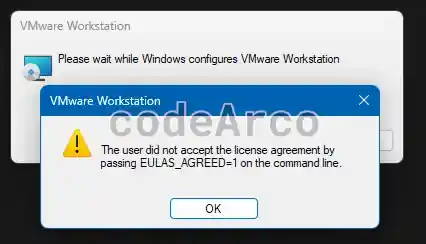
In my case, this error is because I did not download the VMware installer directly from the official website, but rather I tried to install one that a colleague gave me. I hope and understand that the installer on the official VMware website does not contain this type of error.
The steps to fix the error are:
- Right click on the .exe installer.
- Select “Send to”, “Desktop (create shortcut)”.

Create shortcut to fix the error - Find the “Shortcut” tab, “Destination” section.
- Add the text /v EULAS_AGREED=1 at the end, after the double quotes and with a space after them.

Destination EULAS_AGREED 1 error fix - Click accept and run the shortcut.

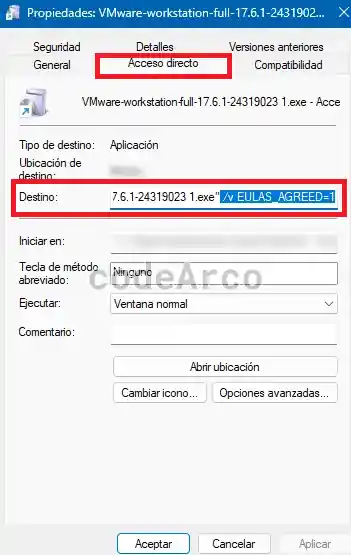
As you can see, the error has a simple fix, which consists of creating a shortcut on the desktop and passing it the missing parameter.