
Keywords placement, better known as word prominence, refers to search engines giving more importance (or prominence points) to certain parts of a website than others. In other words, search engines give higher or lower SEO scores to keywords depending on where they are located and, therefore, we will have to think about the best strategy to know where to use keywords.
We can divide keywords placement into two categories:
- Keywords in URLs, files and images, what we will try to generate are URL SEO friendly, that is, resource addresses that are easy to read and understand.
- Keywords in HTML elements where we will analyze the priority that search engines give to the location of the terms in the different HTML sections.
URL SEO friendly, files and images
One of the key sections to improve the SEO of a web page is to take into account the importance of keywords in the URL or, in other words, have URL SEO friendly.
In general, the characteristics of an URL SEO friendly are:
- It contains descriptive terms that help us get an idea of what we are going to find when we visit the specific page. It is self-explanatory in itself. For example myWeb.com/contact/sendEmail.html.
- It is easily readable and understood by humans.
- It contains the keywords for which we want to position a website in a general way. For example mySEOWeb.com/contact/sendEmail.html
An example of a website that is not an URL SEO friendly is myWeb/con/pageId=56&dx=345. This url does not comply with any of the previous points, it does not contain keywords for which we want to position ourselves, it is not readable or understandable by humans and we do not know what we are going to find when we visit it.
In a little more detail, the most important parts of an URL SEO friendly are:
- Domain name. The terms used in the name we use on our website influence the positioning.
- Name of folders and HTML files. The structure of a website, as well as the name of the HTML files, allow users and robots to know how the content is organized as well as get an idea of the content of each article through the file name.
- Name of images and other files. It is also important to stop and think about the name of the images and various files used on a website because, as before, they allow humans and robots to superficially know the content based on the name.
Additionally, we will answer the following questions:
- Can we repeat keywords in a url? Sometimes, given the structure of a site, it will be necessary to repeat terms in the URLs but… How does this affect SEO?
- What are stop words and where to use them? Stop words are words ignored by search engines, without their own meaning but… Where can we use stop words?
Keywords in HTML
Another key section to improve the positioning of a web page is to take into account the importance of keywords in the HTML. The terms we use will have more or less importance for SEO positioning depending on the HTML section in which they are found.
For example, suppose we want to position our website for the term “used cars”, well, if we use those words in the title of the page it will have a greater impact on search engine listings than if we use it in the last paragraph of an article.
That is why we can create a list of HTML elements ordered by importance for SEO:
- Page title, <TITLE>. Text that appears in the browser tab or bar and is one of the most important elements where to use keywords to position ourselves.
- Page description, <meta description>. It is used to write a short summary of what the user will find when they visit a specific article.
- Headers or headings, <H>. They allow establishing a hierarchy of titles to improve the structure of the document and thus make it easier for the user to read. Another good place where to use keywords.
- Links or anchor text, <A HREF>. They improve the user experience by allowing them to navigate through the content and, in addition, they are also important for SEO Off Page as we will see later.
- Text in bold and italics, <B> and <I>. Highlighted text in different ways that improves the readability of the text and, consequently, the user experience. It is also important for robots because they interpret them as keywords in the text.
- Lists, <UL> and <OL>. Collections of elements that share something in common, can be ordered or unordered.
- Title and alternative text on images, IMG ALT vs TITLE. Images also contain a title and a description used to describe them similar to a post within your website.
- Footer, <FOOTER>. HTML section that allows us to repeat content across multiple pages without having to repeat HTML code. Ideal place where to use keywords and have them repeated on all pages.
- Initial content and first paragraphs <P>. In this section we will analyze the importance of the initial content and the first <P> paragraphs of an article.
The domain name is important
The domain name has an influence on SEO. If it contains a keyword, the better, although it will not always be possible.
Let’s take an example, the domain myCompanyUsedCars.com is better than myCompany.com. In this way we will be able to include a key concept in the domain of the web.
However, sometimes this is not possible due to multiple factors, for example, because the name of our company is already long or because the name has already been chosen before applying SEO to the website. In these cases it is preferable to have a short domain name than to lengthen it even more with keywords.
Naming files and images for SEO
In the same way, the URLs of specific resources such as images or files are important for SEO. It will be necessary to give a correct and self-explanatory name to the files and images so that they are better indexed by search engines.
Make sure, before uploading any image or document, to rename it with keywords. This way you will get an URL SEO Friendly for your resources and, as a consequence, you will be able to position yourself in specific search engines such as, for example, the Google image search engine.
SEO recommendations for files and images, in general, are:
- Use keywords for names.
- Do not use special characters such as accents.
- Reduce the url as much as possible so that it is not too long, neither in number of terms nor in number of levels.
- Avoid using words that are not key and unnecessary such as “to”, “in”, “is”, “the”… etc, that is, avoid stop words in files and urls.
- Avoid parameters in the url such as, for example, myWeb.com/blog/SEOFriendly?page=1.
- Separate words with hyphens, do not use spaces or underscores for this.
As you can see, despite not being a complex topic, it is necessary to first think on the terms for which we want to position ourselves and, then, meditate on where to use keywords intelligently and without overusing the names in the resources on our website.
Although the names of files and images often go unnoticed and are hardly given importance, it is one of the best places where to use keywords.
Repeated keywords in url?
One of the doubts that arose when designing a website is that, given the structure of a site with folders and articles, can repeating keywords in the url lead to SEO penalties?. The quick answer is no, as long as you don’t overdo it.
In more detail, a url is used to structure the content of a website and, therefore, is used to help the user get an idea of the structure of our site and make it easier for them to navigate through it or, in other words, a URL improves the user experience. We must remember that we are not writing and structuring the site for search engines or robots, but for human beings.
Therefore, one of the decisions before creating a site is to define the structure that it is going to have. As a consequence of this decision there will be situations in which it is inevitable for us to repeat keywords in the urls.
An example of a repeated keyword in the url is that of a website that decides to categorize all its posts under a folder with the name of the main category because it talks about several topics and wants to have them separated and well organized. Let’s say, for example, that the website decides to create an article that talks superficially about what SEO is, the url will be mySite.com/SEO/what-is-SEO.html. Does this mean that we will have a SEO penalty? Most likely not because Google is able to understand that we are prioritizing user experience and site structure over SEO optimization.
Another very different example would be if we repeated the word SEO 4 or more times in the URL. In this case, the most likely thing is that the website does not do so by correctly structuring the content or the user experience, but by over-optimizing SEO (what is known as Black Hat SEO) with the aim of positioning itself better, however, this is not a good practice, it can lead to SEO penalties.
What are stop words and where to use them?
First of all, we will begin by defining what stop words are, words that have no meaning by themselves but that help to understand the meaning of a phrase as a whole. Some examples of stop words are “by”, “the”, “of”, “in”, “at”, etc. As you can see, we can say that they are the opposite of keywords.
The really interesting thing about these words is that search engines do not take them into account, they are ignored by them when displaying results. We could say that there are plenty of them when writing a website, but let’s not forget that our content is aimed at humans and not robots, which is why we must be cautious when it comes to knowing where to use stop words:
- We will avoid using stop words in urls because they have a limited size, they cannot be infinite. Furthermore, the shorter a URL is and the better structured it is, the better it will be for both robots and humans because it will be easier for them to get an idea of the structure of a website in general.
- It is correct and good to use stop words in the HTML because it facilitates reading, improves the user experience and this, in turn, allows us to comply with one of the principles of creating quality content, creating content that is easy to read and understand. Imagine that you had to read this entire article without any stop words… Would you be able to, would you like it, and would it be easy for you to read?
Page title, <TITLE>
Refers to the title of a specific web page. The HTML tag <TITLE> is used and goes inside the <HEAD> section.
Most web content managers generate it automatically based on the title chosen for the page or post. Search engines use it to know what a certain article is about and to use it as a title in search results. It is one of the best places where to use keywords.
The recommended length of the title <title> is 60 characters so try to be brief and carefully choose the keywords you put in this section.
Page description, <meta description>
It is the description or summary of the content of a specific page. The HTML meta name description tag is used within the <HEAD> section.
Again, content managers provide us with facilities to establish the description in a simple way without having to touch code. Search engines, as in the previous example, use it to know a little more detail about what a specific page is talking about (using the keywords from it) and to use it as a description in the search results.
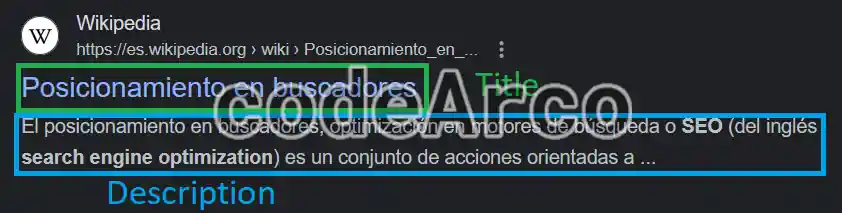
The recommended length of the <meta description> description is 160 characters. If we exceed this length, as you can see in the image, the search engine will cut off the text, so try to be brief as well as explanatory.
Headers or headings, <H>
It refers to the headers or subtitles used within a specific web page. They are the HTML tags <H1> to <H6> that go inside the <BODY> section.
Some content managers automatically enter the same in the <H1> as in the <TITLE>, for example, WordPress in some of its versions. If this were our case, we would have to avoid, at the content level of a specific web page, using <H1> tags because we would already have them and, therefore, all the subtitles/headers used in a post should start from <H2>.
If what we want is to improve our SEO, it is preferable to use the hierarchy of headings instead of words in bold and/or large letters. It is the most important element where to use keywords after the title and description of the article.
Links and anchor text, <A HREF>
It is the basic element of the web, the text that allows us to navigate through information to other sites, whether external or internal. They are the HTML <A> tags that go inside the <BODY> section.
It is essential that the text that acts as a link is descriptive, concise and contains the keywords for which we want to position ourselves. Texts such as “click HERE” should never be used. At the level of SEO Off Page it is the most important place where to use keywords.
Referring to this section we have breadcrumbs. These are nothing more than links that allow the user to know at all times where they are on the page. Not only are they positive for improving SEO and word prominence in HTML, they also provide a better user experience and therefore improve the usability of the web page.
Text in bold and italics, <B> and <I>
Used with the HTML <B> and <I> tags found within the <BODY> section, it allows content to be highlighted in different ways.
In both cases, like the links, the texts in bold and italics should not be a phrase that is too long, they should be small terms for which we want to position ourselves. As we mentioned before, they are important for robots since they interpret them as keywords of the text.
Italics are not as important as bold for SEO.
Lists, <UL> and <OL>
It refers to the <UL> and <OL> tags within the <BODY> and are used to group elements that have something in common.
Search engines generally consider what is in a list to be important elements. It is preferable to use lists instead of plain text when possible. However, if the list is made up of very long elements, it is preferable to use the heading hierarchy instead of kilometric lists.
Title and alternative text on images, IMG ALT vs TITLE
The alternative text <IMG ALT> and title <IMG TITLE> of the images you upload to your site are also important but… at the SEO level, what is the difference between alt and title in images?:
- IMG TITLE is the title of the image, a short summary of what it contains. For SEO it is not so important, it is mainly used to improve the user experience since most browsers show a floating message when we hover the mouse pointer over it.
- IMG ALT is the text description of the image, here we can expand a little more. For SEO it is very important, it is used by screen readers (for people with cognitive difficulties) and by the search engines themselves to know what the image is about and thus allow, for example, that when we search for “bicycle” the search engine is able to find images of bicycles.
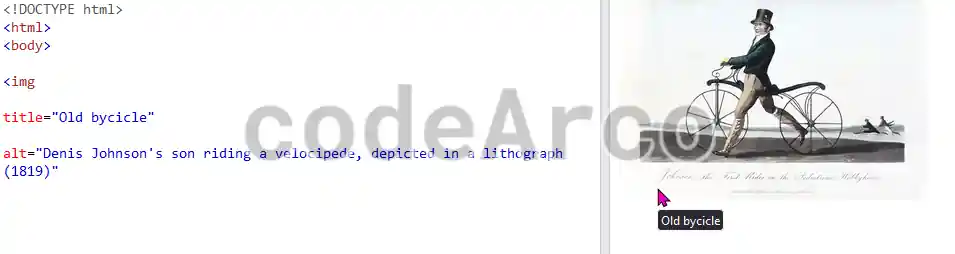
My recommendation is that you do the same as for an article, remember to establish both, giving more importance and detailing, above all, the ALT attribute since it is the most important element where to use keywords for image search engines and software for people with disabilities like visual difficulties.
Footer, <FOOTER>
It is the bottom part of a website that is repeated on almost all of its pages. It is the HTML <FOOTER> tag that goes inside the <BODY> section.
The footer is a key point that we should not take lightly.
If we remember, in the article on global or general word density, we indicated that the fact that a few keywords appear on many pages was positive for positioning these keywords and, therefore, improving our SEO.
On the other hand, something similar was also commented in the article on local or page word density, that it is positive for a specific page that a certain term appears several times without exceeding it.
Taking into account that the footer is an HTML element that appears on all the pages of a website, if we think carefully about the terms, it is another of the best places where to use keywords as it will allow us to greatly boost the SEO of our website because these keywords will be repeated on all pages.
Furthermore, if we go a little further, it is not only about introducing keywords in this, we can also use the HTML elements indicated in this section within the footer to give more emphasis to the key terms.
First paragraphs and initial content, <P>
Initial content is important for SEO for the following reasons:
- Human factor, the most important. People, by nature, tend to pay more attention to the first sections than the last ones. It is as easy as thinking: What do I do when faced with a long article? We read the first paragraphs, the first headings and bold letters… etc. If we are interested, perhaps we read everything in detail, but if after that first impression the content we see is not interesting, we will leave the page.
- Search engine robots. For robots it is easier, we can say that they are not as lazy as us and are capable of reading much faster than a human being, yet they give more importance to the elements that are in first positions. For example, if we do not establish a description tag on an article, they will obtain the first lines they find as the description of the article.
Now, where is the initial content? It is not only found in the first <P> paragraphs of a page, it is found in all the HTML elements explained above, such as, for example, the first words of the title <TITLE>, first sentences of the description <meta description>, first headings <H> of a web page or first paragraphs <P>.
For this reason you must think carefully about how and what to write in the initial part of each HTML element throughout your web page.
As you can see, it is not a complex topic, it is simply advisable, before publishing content, to stop and reflect on the terms and where to use keywords within the URLs and HTML.