
In SEO, web speed and performance are important factors to take into account. A slow web page will be penalized and a web page that loads quickly and performs efficiently will be favored in search results. Therefore, if what you want is to improve the SEO of your website, you must optimize its loading speed.
Before starting this post, it is worth remembering that it is necessary to know the metrics and tools to check web speed.
There are multiple tools on the market to improve web speed, in this article we will talk specifically about three:
Optimize web speed with WebPageTest
The first thing to take into account are the scores obtained in WebPageTest, more specifically, in the summary. We must investigate the general scores and, anything that does not have A or B values, we must delve into it and solve it as soon as possible, since they are serious errors that will penalize our SEO.
Improve DNS speed
We have two options to improve DNS resolution speed:
- Use DNS replication, that is, hire the service of a company that allows us to have several DNS servers spread around the world instead of just one so that the process time does not depend so much on the location of the requester.
- Contract the domain name and hosting with the same company. If this is not possible, the solution of replicating DNS is also valid for this problem and it is not even incompatible to have both at the same time.
Loading errors and heavy items
If what we want is to optimize web speed and its performance, we must pay attention to each of the Waterfall records, especially the errors (which we will try to solve) and the elements that take too long to load (which we will try to optimize), such as, for example, images and multimedia elements.
The strategy to follow in all the tools is the same, first we will solve the most serious problems that have the most impact on our website and, later, we will address the milder problems or those with less impact.
Web speed issues with Google Search Console
Now that we know the main web metrics of Google Search Console, we will move on to solving web speed problems. To do this, it is necessary to observe the tables and graphs where the pages of our website are grouped through the following categories:
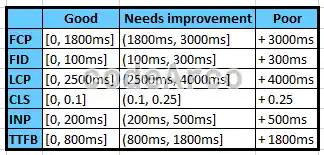
If what we want is to improve SEO positioning, we must start by optimizing the loading speed of poor pages and then those that need improvement.
However… How do we solve web speed problems? It depends on the type of error we have:
- FCP error or First Content Paint. Since it is an error in the rendering time of the first element, it will be necessary to review the Waterfall of our website, observe which elements are loaded before the rendering of the first element and minimize them as much as possible. Sometimes unnecessary elements are loaded at the beginning whose loading we can delay in time, when the page has already been painted.
- FID error or First Input Delay. This section is a little more complicated than the previous one but it begins with the same step, identifying the element that takes time to respond to the user, such as, for example, the vertical scroll that we talked about previously. After that and, using web development knowledge, it will be necessary to optimize the code causing this problem.
- LCP error or Largest Contentful Paint. Since the LCP measures the rendering time of the element with the greatest weight on the web, it will be necessary to identify said element and optimize it. If, for example, the element is a video, we should use something similar to Youtube’s HTML embeds. Another example could be an image, in this case we should reduce the weight of the image with GIMP or some other alternative.
- CLS error or Cumulative Layout Shift. Solving CLS errors is quite similar to solving FID errors, first we have to identify the source of the problem (it can be a plugin, skin or theme and even some code fragment) and then try to solve it but, as before, it requires knowledge of web development.
- INP error or Interaction to Next Paint. We must review all possible user interactions and identify those that take the longest. We will focus on reducing the response time of those that take the longest.
- TTFB error or Time to First Byte. Perhaps this is one of the easiest, it is quite easy to reduce the time of the first byte using CDN near the location of our website users.
Improve web speed with Google PageSpeed Insights
Google PageSpeed Insights is a very useful tool if we want to improve web speed, both in computer and mobile versions.
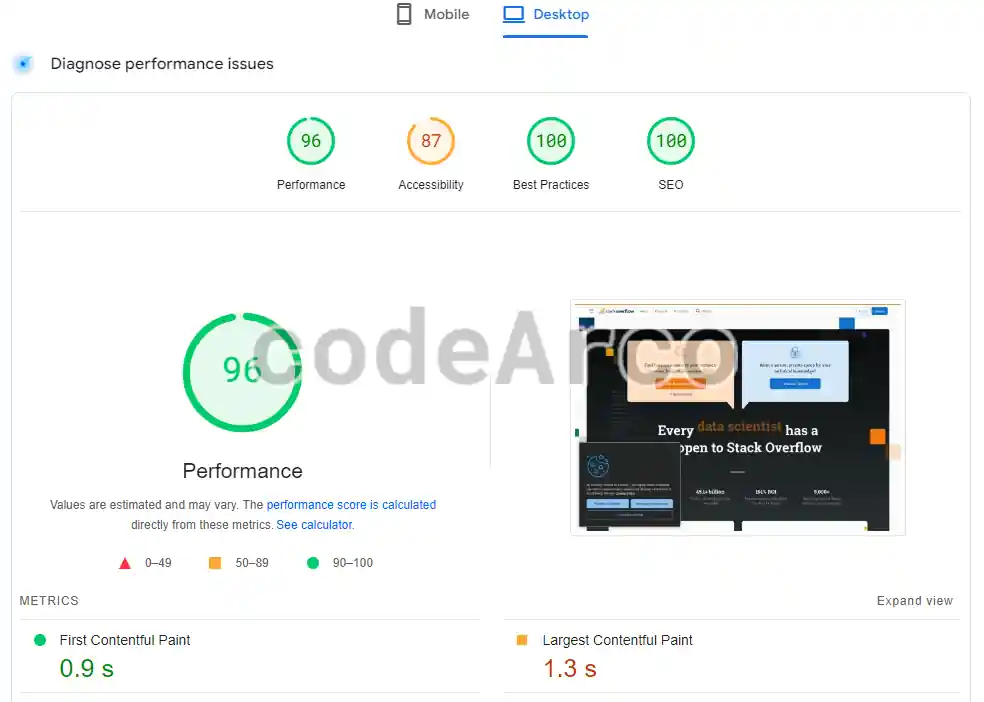
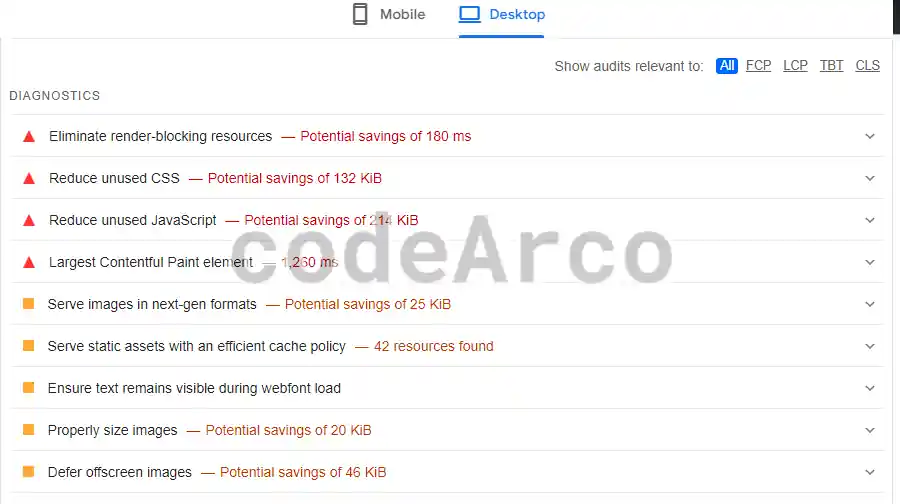
The way to improve the web speed using this tool is by following the optimization recommendations that appear on the page itself, especially in the performance section, although we must not lose sight of the rest of the sections.
Some recommendations from Google PageSpeed Insights to optimize the performance of a website are:
- Removes rendering-blocking resources.
- Appropriate size images.
- Snooze images off screen.
- Minify CSS.
- Minify JavaScript.
- Remove unused CSS.
- Encode images efficiently.
- Serve images in next generation formats.
- Enable text compression.
- Preconnect to the required origins.
- Reduce server response times (TTFB).
- Avoid multi-page redirects.
- Preload key requests.
- Use video formats for animated content.
- Reduce the impact of third-party code.
- Avoid uncomposed animations.
And other recommendations to improve web speed are:
- Avoid huge network payloads.
- Serve static assets with an efficient caching policy.
- Avoid excessive DOM size.
- Avoid chaining critical requests.
- User timing marks and measurements.
- Reduce JavaScript execution time.
- Minimize the work of the main thread.
- Ensure that the text remains visible while the web font loads.
- Keep request counts low and transfer sizes small.
Reduce image weight
In general, the elements that usually take the longest to load and, therefore, that most affect the loading speed of a website are images and heavy multimedia elements.
The best thing for images is to reduce their size with GIMP or some other program, taking 100 Kb as a maximum value guide for large images like those that appear in the sliders and 50 Kb for the rest. To reduce the weight of an image, there are multiple solutions, programs and websites on the market that allow you to do it easily and for free.
In addition to the above, we can also use the image thumbnail technique in such a way that what appears is a small image with very little weight and, if the user clicks on it, the image with a higher resolution is loaded.
Optimize multimedia elements
Try to avoid heavy multimedia elements such as videos. Change them with links to other pages where they are hosted or use HTML embeds like those provided by YouTube.
Furthermore, if you can afford it financially, it is advisable, for all the resources on a website, whether images, documents, videos… etc to use data replication through CDN. A CDN or Content Delivery Network basically consists of hiring a service that will allow us to have all those multimedia resources replicated on different servers and located in different parts of the world to improve the loading speed of a website regardless of where it is accessed from the user.