
We recently analyzed the correct way to convert the appsettings.json to an object in .NET. Well, in this article we’re going to look at how to fix an error resulting from using Bind or Get, although, as we’ll see below, the error can also be encountered in other scenarios.
Example codebase
The example code to fix the error because it is missing a public instance constructor can be found in the Github repository for this article, although we’ll list the main elements below.
First, we have a console application written in C# where we have installed the following packages to convert the appsettings.json object to a C# object:
<ItemGroup>
  <PackageReference Include="Microsoft.Extensions.Configuration.Binder" Version="9.0.7" />
  <PackageReference Include="Microsoft.Extensions.Configuration.Json" Version="9.0.7" />
</ItemGroup>
Then we have the following code inside the Program.cs class that only reads the json and converts it to an object through the Get and Bind alternatives:
using Microsoft.Extensions.Configuration;
using MissingAPublicInstanceConstructor;

internal class Program
{
    private static void Main(string[] args)
    {
        var build = new ConfigurationBuilder()
        .AddJsonFile("appsettings.json")
        .Build();

        // Alternative 1
        var config1 = build.Get<Config>();

        // Alternative 2
        var config2 = new Config();
        build.Bind(config2);

        // Output
        Console.WriteLine($"config1?.PropString: '{config1?.PropString}'");
        Console.WriteLine($"config1?.PropClass1.PropString: '{config1?.PropClass1.PropString}'");

        Console.WriteLine($"config2.PropString: '{config2.PropString}'");
        Console.WriteLine($"config2.PropClass1.PropString: '{config2.PropClass1.PropString}'");
    }
}
Next we have the classes that represent our configuration, they are completely normal classes with simple and complex properties:
namespace MissingAPublicInstanceConstructor
{
    public class Config
    {
        public Config() { }
        public string PropString { get; set; }
        public int PropInt { get; set; }
        public Class1 PropClass1 { get; set; }
        public Class2 PropClass2 { get; set; }
    }
    public class Class1
    {
        public Class1() { }
        public string PropString { get; set; }
        public int PropInt { get; set; }
    }
    public class Class2
    {
        public Class2() { }
        public string PropString { get; set; }
        public int PropInt { get; set; }
    }
}
And finally we have the appsettings.json file that we will convert to an object of the Config.cs class:
{
  "PropString": "Text example",
  "PropInt": 123,
  "PropClass1": {
    "PropString": "Text Class1",
    "PropInt": 456
  },
  "PropClass2": {
    "PropString": "Text Class2",
    "PropInt": 789
  }
}
Full error description
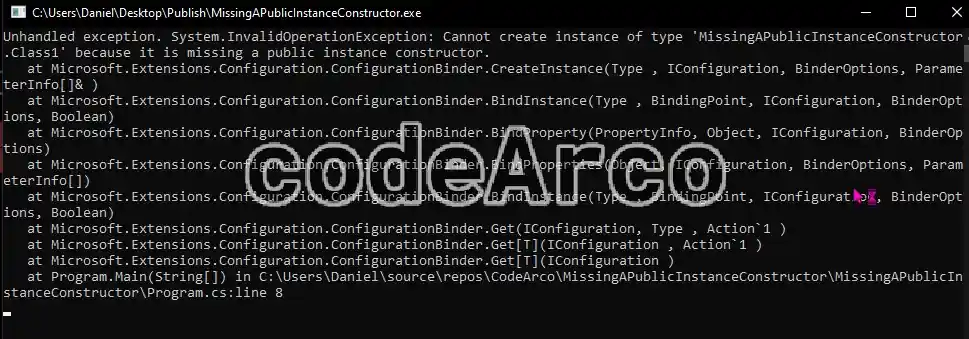
The full error when running the application is as follows:
Unhandled exception. System.InvalidOperationException: Cannot create instance of type 'Project.Class' because it is missing a public instance constructor.
   at Microsoft.Extensions.Configuration.ConfigurationBinder.CreateInstance(Type , IConfiguration, BinderOptions, ParameterInfo[]&)
   at Microsoft.Extensions.Configuration.ConfigurationBinder.BindInstance(Type , BindingPoint, IConfiguration, BinderOptions, Boolean)
   at Microsoft.Extensions.Configuration.ConfigurationBinder.BindProperty(PropertyInfo, Object, IConfiguration, BinderOptions)
   at Microsoft.Extensions.Configuration.ConfigurationBinder.BindProperties(Object, IConfiguration, BinderOptions, ParameterInfo[])
   at Microsoft.Extensions.Configuration.ConfigurationBinder.BindInstance(Type , BindingPoint, IConfiguration, BinderOptions, Boolean)
   at Microsoft.Extensions.Configuration.ConfigurationBinder.Get(IConfiguration, Type , Action`1 )
   at Microsoft.Extensions.Configuration.ConfigurationBinder.Get[T](IConfiguration , Action`1 )
   at Microsoft.Extensions.Configuration.ConfigurationBinder.Get[T](IConfiguration )
   at Program.Main(String[] args) in C:\Users\Daniel\source\repos\CodeArco\Project\Solution\Program.cs:line 8
And the part that really interests us are the following two lines:
- Cannot create instance of type ‘Project.Class’ because it is missing a public instance constructor, this line indicates that an instance of a project class cannot be created because it doesn’t have a public constructor and no parameters. As we’ll see later, this isn’t entirely true.
- at Microsoft.Extensions.Configuration.ConfigurationBinder.Get, this line indicates that the error occurs in the
Getmethod we use to convert theappsettings.jsonto an object.
When and why the error occurs
The most interesting part of this error is that the description is erroneous or confusing. That is, the error does not occur when a public constructor is missing, the error actually occurs when the following two points occur simultaneously:
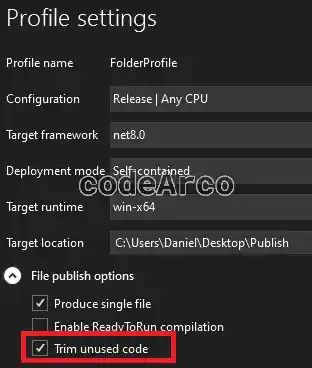
- Trim unused code is being used when publishing. If you don’t enable this option, the error will not appear.

Trim unused code in c sharp - Reflection is being used, directly or indirectly, somewhere in the code. In this case the method that uses reflection internally is
Getto convert theappsettings.jsonto the object represented by theConfig.csclass.
Given the above we can conclude that the error occurs because:
- An instance of an object (in our case
Config.cs) is being created through reflection using the public, parameterless constructornew(). - Since this constructor isn’t referenced anywhere in the project the trim unused code removes it and, consequently, when it’s invoked by reflection, it throws a runtime error because it can’t be found.
It’s also interesting to know that by default C# creates public, parameterless constructors whenever your class doesn’t have other constructors. This means that it’s not always necessary to create them; we’ll look at this in more depth later.
It’s also important to keep in mind that this error can occur in other scenarios where reflection is used, not just in binding done through the Get method.
Not recommended solutions to avoid
Before proceeding to analyze the solution to the “because it is missing a public instance constructor” error, let’s see what the not recommended solutions are. These will not fix your error or will do so in a very questionable way:
- Creating empty constructors without doing anything else in all affected classes. This will not fix the error. In our case the modification would consist of creating a
new()in all the configuration classes.
The problem does not occur because anew()is missing, the problem occurs because trim unused code is eliminating thenew()since it is not being referenced anywhere in the code.
As we mentioned before, C# creates parameterless, public constructors by default in classes that do not have any other constructors. Therefore, creating empty, public constructors is only necessary if you have other constructors in the class. - Referencing empty constructors in your code works and will fix the error but it’s a very messy solution that doesn’t follow clean code practices.
In our case, if we use the following code inProgram.csthe error will disappear but, as you can see, it looks pretty ugly:var c = new Config(); var c1 = new Class1(); var c2 = new Class2(); - Disabling trim unused code will also fix the error but it’s a rather drastic solution that you should avoid. Below, we’ll see that the solution is to partially disable trim unused code. This way we’ll be able to fix the error while maintaining the benefits of trim unused code.
- Using
Bindinstead ofGetwill not fix the problem, it will only camouflage it.
As we discussed in the article convertingappsettings.jsonto a C# object theBindmethod is less restrictive or error-tolerant thanGet. If you test it with trim unused code you’ll see that the error “because it is missing a public instance constructor” won’t appear, but a new one will appear when you try to read the configuration since it will be empty or initialized to the default values:Unhandled exception. System.NullReferenceException: Object reference not set to an instance of an object. at Program.Main(String[]) in C:\Users\Daniel\source\repos\CodeArco\MissingAPublicInstanceConstructor\MissingAPublicInstanceConstructor\Program.cs:line 24
Error object reference not set to an instance of an object

Recommended solution with TrimmerRoot.xml
The first step to fix the error is to create public and parameterless constructors in all classes but… why should we create them if we previously mentioned that it’s not necessary? Well, because it’s only necessary to create them in classes that have other constructors, since C# only creates them automatically if there are no constructors. In other words, to avoid forgetting them in any class, we’re going to create them in all of them.
The second step is to create the TrimmerRoot.xml file in the root of your project with all the classes you don’t want to be code-trimmed:
<linker>
    <assembly fullname="MissingAPublicInstanceConstructor">
        <type fullname="MissingAPublicInstanceConstructor.Config" preserve="all" />
        <type fullname="MissingAPublicInstanceConstructor.Class1" preserve="all" />
        <type fullname="MissingAPublicInstanceConstructor.Class2" preserve="all" />
    </assembly>
</linker>
Note that MissingAPublicInstanceConstructor is the project name and that we have one line for each class used in the configuration.
The third step is to update the project’s .csproj and reference the previous file through the TrimmerRootDescriptor node:
<ItemGroup>
    <TrimmerRootDescriptor Include="TrimmerRoot.xml" />
</ItemGroup>
Finally, clean, recompile, and publish the application with trim unused code and check that the “because it is missing a public instance constructor” error has been resolved: