
This error appears when we try to migrate the .NET version of an Azure Function from 6 to 8 with the function type “in process”.
The errors found are:
- Error configuring services in an external startup class.
- Could not load file or assembly XXX Version=8.0.0.0.
The error is mainly due to two reasons:
- Incorrect version of Microsoft.NET.Sdk.Functions.
- Missing parameters or environment variables.
- Wrong version of Microsoft Nuget packages.
Incorrect version of Microsoft.NET.Sdk.Functions
At first the error appeared only in the local environment, full description of the error:
Error configuring services in an external startup class. XXX.Function: Could not load file or assembly ‘System.Linq, Version=8.0.0.0, Culture=neutral, PublicKeyToken=b03f5f7f11d50a3a’. The system cannot find the file specified.
This was because in the .csproj I only changed the TargetFramework from .NET 6 to .NET 8 to migrate the Azure Function:
<Project Sdk="Microsoft.NET.Sdk">
    <PropertyGroup>
        <TargetFramework>net8.0</TargetFramework>
        <AzureFunctionsVersion>v4</AzureFunctionsVersion>

    </PropertyGroup>
    <ItemGroup>
        <PackageReference Include="Microsoft.NET.Sdk.Functions" Version="4.2.0" />
...
However, as you can see, the .NET version is 8 but the Azure Functions have an older version, 4.2.0.
To fix the error, you have to change the last line to the latest version of Azure Functions, which is currently 4.4.1:
<PackageReference Include="Microsoft.NET.Sdk.Functions" Version="4.4.1" />Configure environment variables
Later, the error appeared again when we uploaded the function to Azure, even though we made the changes correctly:
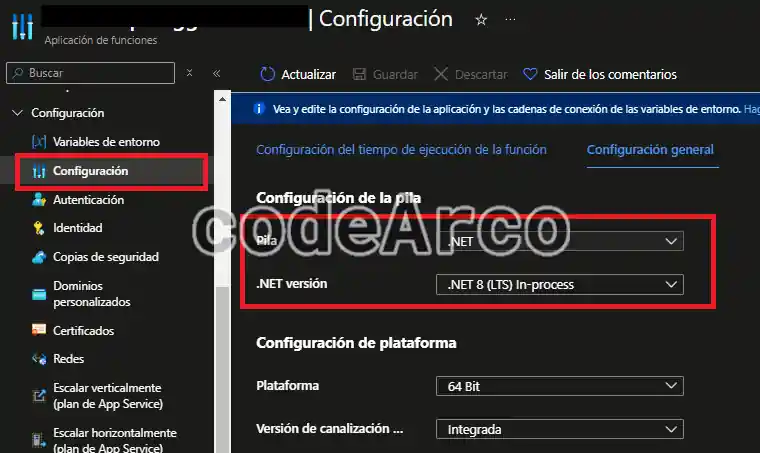
The following error appeared in the function notifications:
Microsoft.Azure.WebJobs.Script: Error configuring services in an external startup class. XXX.Function: Could not load file or assembly ‘Microsoft.Extensions.Configuration.Abstractions, Version=8.0.0.0, Culture=neutral, PublicKeyToken=adb9793829ddae60′. The system cannot find the file specified. Value cannot be null. (Parameter ‘provider’)
Well, in this case it is because we are missing environment variables as indicated in the official Microsoft documentation to migrate an Azure Function in process from .NET 6 to .NET 8:
- The application setting FUNCTIONS_WORKER _RUNTIME must be set with the value “dotnet”.
- The application setting FUNCTIONS_EXTENSION_VERSION must be set with the value “~4”.
- The application setting FUNCTIONS_INPROC_NET8_ENABLED must be set with the value “1”.
These changes must be applied locally through the local.settings.json file:
{
  "IsEncrypted": false,
  "Values": {
	"AzureWebJobsStorage": "UseDevelopmentStorage=true",
	"scheduletriggertime": "0 */1 * * * *",
	"FUNCTIONS_INPROC_NET8_ENABLED": "1",
	"FUNCTIONS_WORKER_RUNTIME": "dotnet",
	"FUNCTIONS_EXTENSION_VERSION": "~4"
  },
And then, when deploying, we must apply them in Azure through the Configuration section, Environment Variables:
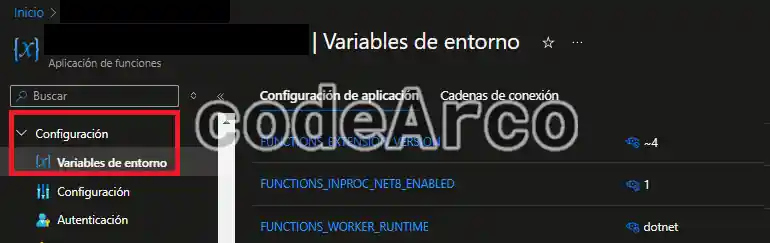
Once this is done, the Azure function works correctly without throwing any notifications or errors.
Wrong version of Microsoft Nuget packages
Let’s say we have the following function:
- Version .NET 6.
- Http type, created from the Microsoft template and Visual Studio.
- Modified to add the Startup.cs and dependency injection using the linked tutorial.
- Finally we have added the Nuget
<PackageReference Include="Microsoft.Extensions.Http" Version="8.0.1" />so that we can add an Http client in the Startup through the linebuilder.Services.AddHttpClient();.
If we try to run it, the following error will appear:
Error configuring services in an external startup class. FunctionApp1: Could not load file or assembly ‘Microsoft.Extensions.Http, Version=8.0.0.0, Culture=neutral, PublicKeyToken=adb9793829ddae60’. The system cannot find the file specified.
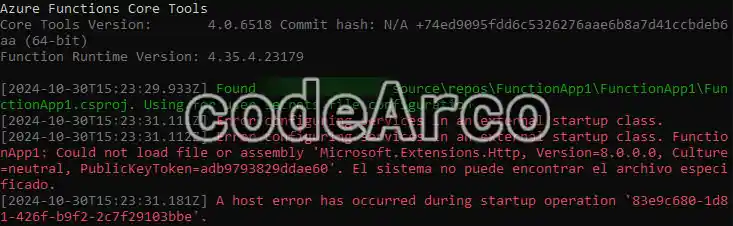
The problem we have here is that the Nuget package we have installed is version .NET 8 while our function uses version .NET 6. In other words, the Azure Functions runtime is .NET 6 and the <PackageReference Include="Microsoft.Extensions.Http" Version="8.0.1" /> package is not found within it.
To fix the error we will simply downgrade the Nuget package version to the .NET version that we have in the function, in this case, version 6.0.0:
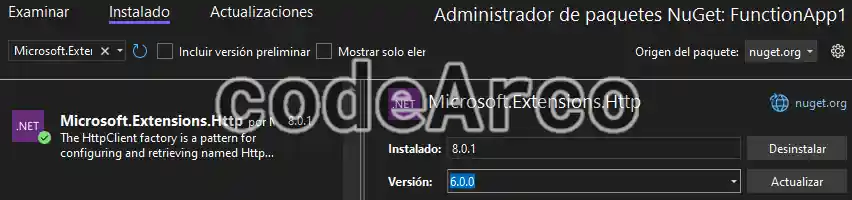
Finally, I would like to highlight an important point to keep in mind: in this case, the error is directing us directly to the package that we have installed, but it is possible that the error shows us a package that we have not installed directly because it is a dependency of another package that we have installed.
In this last case, we could solve the error in two ways:
- Install an older version of the parent package, the one we have installed.
- Manually install an older version of the dependency that appears in the error in the project.
However, if the error you get is similar to “Could not load file or assembly. The system cannot find the file specified.”, I recommend you take a look at the linked post where I analyze this case in more depth.